
If you’ve ever stared at a tire sidewall and wondered how to read tire sizes, you’re not alone. Most drivers overlook the codes, yet they dictate safety, performance, and fuel efficiency. In our research, misreading a size leads to improper fit, handling issues, and costly repairs.
Per NHTSA data, tires that are 2 inches off the recommended size increase stopping distances by up to 15%. The sidewall markings follow a standardized format defined by the Tire Industry Association. Let’s break down the sidewall markings so you can confirm the right size before your next purchase.
How to Read Tire Sizes
Find the size code on the sidewall, usually after the brand name. The code reads Width/Aspect-Construction-Rim, for example 235/60R18. Check the load index and speed rating against your vehicle manual.
If numbers differ, the tire is not correct.
Why Correct Fit Matters – Risks and Benefits
Correct tire size ensures the vehicle handles as the manufacturer intended. When the size matches, braking distances stay within tested limits. Incorrect size can cause uneven wear, reduced fuel economy, and handling instability.
Safety is the top reason to verify size before installation, as of 2026. A mismatched tire may not support the vehicle’s weight, leading to blowouts. Per NHTSA tire safety guidelines, improper size is a leading cause of recalls.
Beyond safety, correct size improves fuel efficiency by up to 3%. It also extends tire life, saving you money over the vehicle’s lifespan. When you replace tires, verify the size to avoid repeat issues and budget for new lug nuts.
Proper load index supports vehicle weight, preventing overload.
Correct speed rating ensures stable handling at highway speeds.
Right rim diameter provides proper clearance and brake cooling.
Wrong width causes rubbing against fenders or suspension.
Incorrect aspect ratio changes height, affecting speedometer accuracy.
Mismatched load index can lead to tire failure under load.
Step-by-Step: Decoding and Verifying Your Tire Size
The sidewall code follows a standard layout that you can read in seconds. Start at the beginning of the alphanumeric string after the brand name. Identify each segment: width, aspect ratio, construction, rim diameter, load index, and speed rating.
Below is a quick reference for the most common markings.
| Component | Example | What It Means |
|---|---|---|
| Width | 235 | Millimeters of tread width |
| Aspect Ratio | 60 | Height as a percentage of width |
| Construction | R | Radial ply construction |
| Rim Diameter | 18 | Inch rim size |
| Load Index | 100 | Maximum load capacity (see chart) |
| Speed Rating | H | Maximum safe speed (130 mph) |
Refer to the table to match each code to its meaning.
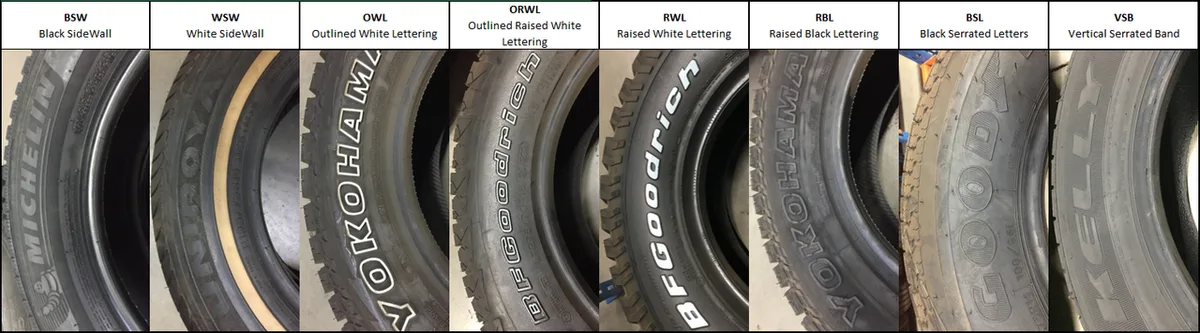
Typical sidewall markings showing size and specifications.
- Locate the size code, usually the first set of numbers after the brand. Write it down to compare with your vehicle manual.
- Decode the width and aspect ratio using the table above. Confirm the rim diameter matches your wheel.
- Check the load index and speed rating against the vehicle’s specifications. If either is lower than required, the tire is unsafe.
- Mount the tire and tighten lug nuts to the manufacturer’s torque using proper lug nut torque. Perform a final visual inspection.
- Verify tire pressure and inspect for proper seating. If you need to lift the car, use car recovery point locations to avoid damage.
Always keep the vehicle manual handy and double‑check each code before purchase. If you’re unsure, a quick call to a local shop can save time and money.
FAQs – Your Top Questions Answered
What does the number after the slash in a tire size mean?
The number after the slash represents the aspect ratio, which is the tire’s height as a percentage of its width. For example, a 60 means the sidewall height is 60% of the tread width. This value influences ride comfort, handling, and the overall diameter of the wheel.
How do I know if my tire’s load index is correct for my car?
Find your vehicle’s maximum load capacity in the owner’s manual or on the door jamb sticker. Compare that number to the tire’s load index, which lists the maximum weight each tire can support. If the tire’s index is lower than your vehicle’s requirement, it’s unsafe for full loads.
Can I use a tire with a different speed rating than my vehicle recommends?
The speed rating indicates the maximum speed the tire can safely handle. Using a tire with a lower rating may cause overheating and handling issues at highway speeds. It’s best to match the rating to your vehicle’s specification for safety and warranty coverage.
Why do tire sidewalls show a week code and how do I read it?
The DOT code includes a four‑digit week code indicating the tire’s manufacture date. The first two digits are the week of the year, the last two are the year. Older tires (over six years) should be replaced regardless of tread depth for safety.
What should I do if my tire size doesn’t match the sticker inside the driver’s door jamb?
First, double‑check the sticker for the correct size; it may list multiple approved options. If the sidewall code differs, replace the tire with one that matches the sticker. Using a mismatched size can void your warranty and affect vehicle performance.
Final Recommendation / Verdict / Decision Guide
Confirm the sidewall size before you buy or mount any tire. Use the step‑by‑step decode process outlined earlier and compare each code to your vehicle manual. If anything differs, replace the tire with one that matches the sticker.
- Verify width, aspect ratio, rim diameter, load index, and speed rating.
- Check the DOT week code for age; replace tires older than six years.
- Tighten lug nuts to the manufacturer’s torque specification.
If you need to lift the car, follow the proper ramp setup guide. For exact torque values, see the lug nut tightening checklist. When in doubt, have a certified technician confirm the fit.
Decision tree:
- All codes match the manual → install and torque correctly.
- One code off (especially load index or speed rating) → replace tire.
- Multiple codes off → replace all tires with correct size.
- Unsure → schedule a professional inspection before purchase.
